> ## Documentation Index
> Fetch the complete documentation index at: https://docs.forecastable.com/llms.txt
> Use this file to discover all available pages before exploring further.
# ZoomInfo integration
> Connect Zoom Enrichment with an API key so Forecastable can enrich contacts using ZoomInfo data.
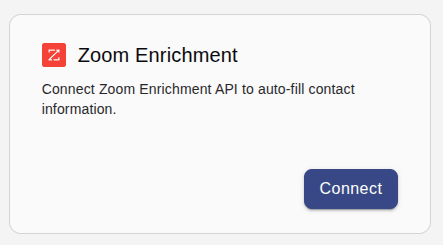
Connect ZoomInfo to enrich contacts in Forecastable. It appears under **Data & Insights** on the integrations page as the **Zoom Enrichment** card.
Start on [Settings → Integrations](https://app.forecastable.com/settings/integrations).
## Get your ZoomInfo API key
You need an active ZoomInfo subscription with API access to generate this key.
1. Sign in to ZoomInfo and open the **Admin Portal**.
2. Go to **Integrations → API & Webhooks**.
3. Click **Generate New Token** (some accounts show this as **Get API Key**).
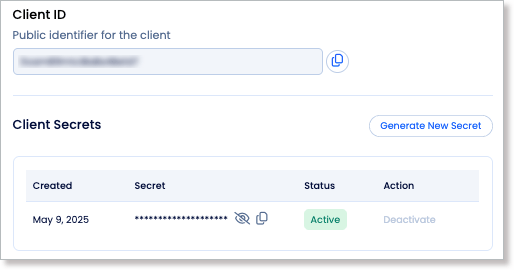 4. Copy the generated key. This is the value to paste into Forecastable's **ZoomInfo API Key** field below.
If you don't see **API & Webhooks** in your Admin Portal, your plan doesn't have API access enabled yet. Contact your ZoomInfo account representative to turn on the Enrich API.
ZoomInfo's standard API credentials (Client ID + Private Key) generate short-lived tokens that expire roughly every hour under their JWT-based auth flow. If your key in Forecastable stops validating after working initially, regenerate it from the Admin Portal above and reconnect. Ask your ZoomInfo rep to confirm whether your Enrich API plan issues a long-lived key or a rotating token, since this affects how often you'll need to reconnect.
## Connect Zoom Enrichment
1. On the **Zoom Enrichment** card, click **Connect**.
4. Copy the generated key. This is the value to paste into Forecastable's **ZoomInfo API Key** field below.
If you don't see **API & Webhooks** in your Admin Portal, your plan doesn't have API access enabled yet. Contact your ZoomInfo account representative to turn on the Enrich API.
ZoomInfo's standard API credentials (Client ID + Private Key) generate short-lived tokens that expire roughly every hour under their JWT-based auth flow. If your key in Forecastable stops validating after working initially, regenerate it from the Admin Portal above and reconnect. Ask your ZoomInfo rep to confirm whether your Enrich API plan issues a long-lived key or a rotating token, since this affects how often you'll need to reconnect.
## Connect Zoom Enrichment
1. On the **Zoom Enrichment** card, click **Connect**.
 2. Enter your ZoomInfo Enrichment API client access key (see [Get your ZoomInfo API key](#get-your-zoominfo-api-key) above).
3. Click **Connect** to save and validate the key.
2. Enter your ZoomInfo Enrichment API client access key (see [Get your ZoomInfo API key](#get-your-zoominfo-api-key) above).
3. Click **Connect** to save and validate the key.
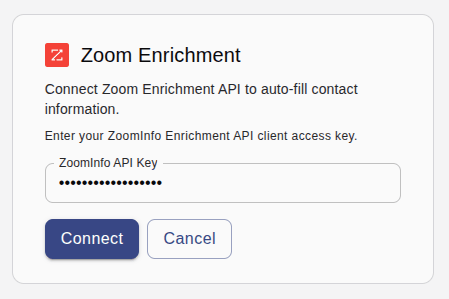 Forecastable validates the key against ZoomInfo before saving it. An invalid key shows an error and the connection is not saved.
## Disconnect
Use **Disconnect** on the Zoom Enrichment card to remove the API key connection.
## How enrichment uses ZoomInfo
Once connected, Forecastable prefers ZoomInfo as the source when enriching contacts. If ZoomInfo is not connected, enrichment falls back to Apollo (if connected), then Hunter.io.
This shows up in Account Details: the **Enrich contacts** button's tooltip reads "Enrich contacts (ZoomInfo)" when Zoom Enrichment is connected.
## Verify the setup
* The Zoom Enrichment card shows **Disconnect**
* The **Enrich contacts** button on an account's contacts shows "(ZoomInfo)" in its tooltip
* Contacts enriched afterward are populated from ZoomInfo data
## Troubleshooting
Confirm the key is an active ZoomInfo Enrichment API client access key, copy it again, and reconnect.
Your ZoomInfo credential may have expired or been rotated. Generate a new key from **Admin Portal → Integrations → API & Webhooks** and reconnect in Forecastable.
Zoom Enrichment appears under **Data & Insights** for Forecastable admins only.
Confirm the Zoom Enrichment card shows **Disconnect** (meaning it's connected). ZoomInfo takes priority over Apollo when both are connected, so check that the API key hasn't been disconnected or become invalid.
Forecastable validates the key against ZoomInfo before saving it. An invalid key shows an error and the connection is not saved.
## Disconnect
Use **Disconnect** on the Zoom Enrichment card to remove the API key connection.
## How enrichment uses ZoomInfo
Once connected, Forecastable prefers ZoomInfo as the source when enriching contacts. If ZoomInfo is not connected, enrichment falls back to Apollo (if connected), then Hunter.io.
This shows up in Account Details: the **Enrich contacts** button's tooltip reads "Enrich contacts (ZoomInfo)" when Zoom Enrichment is connected.
## Verify the setup
* The Zoom Enrichment card shows **Disconnect**
* The **Enrich contacts** button on an account's contacts shows "(ZoomInfo)" in its tooltip
* Contacts enriched afterward are populated from ZoomInfo data
## Troubleshooting
Confirm the key is an active ZoomInfo Enrichment API client access key, copy it again, and reconnect.
Your ZoomInfo credential may have expired or been rotated. Generate a new key from **Admin Portal → Integrations → API & Webhooks** and reconnect in Forecastable.
Zoom Enrichment appears under **Data & Insights** for Forecastable admins only.
Confirm the Zoom Enrichment card shows **Disconnect** (meaning it's connected). ZoomInfo takes priority over Apollo when both are connected, so check that the API key hasn't been disconnected or become invalid.