> ## Documentation Index
> Fetch the complete documentation index at: https://docs.forecastable.com/llms.txt
> Use this file to discover all available pages before exploring further.
# IMAP integration
> Connect an IMAP mailbox in Forecastable and look up IMAP/SMTP settings for common providers.
Connect an IMAP mailbox to enable email-powered features in Forecastable when you are not using Gmail or Microsoft 365.
## Connect IMAP
Start on [Settings → Integrations](https://app.forecastable.com/settings/integrations).
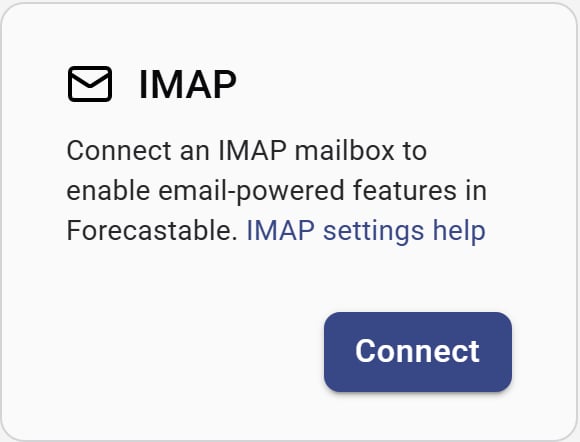 1. On the **IMAP** card, click **Connect**.
2. Enter your mailbox credentials in the hosted IMAP login flow.
3. When it succeeds, Forecastable returns you to Integrations with IMAP connected.
Use the provider settings below for host, port, and security values. You can also open **IMAP settings help** from the card.
## Provider server settings
Use these server settings when connecting an IMAP mailbox to Forecastable. Search by provider name or domain—for example, `yahoo`, `icloud`, or `smtp.mail.me.com`.
**Domains:** yahoo.com, ymail.com, rocketmail.com
| Setting | Value |
| ------------- | --------------------- |
| IMAP host | `imap.mail.yahoo.com` |
| IMAP port | `993` |
| IMAP security | SSL |
| SMTP host | `smtp.mail.yahoo.com` |
| SMTP port | `465` |
| SMTP security | SSL |
Use your standard Yahoo Mail credentials.
**Domains:** icloud.com, me.com, mac.com
| Setting | Value |
| ------------- | ------------------ |
| IMAP host | `imap.mail.me.com` |
| IMAP port | `993` |
| IMAP security | SSL |
| SMTP host | `smtp.mail.me.com` |
| SMTP port | `465` |
| SMTP security | SSL |
Use your iCloud Mail credentials.
**Domains:** aol.com
| Setting | Value |
| ------------- | -------------- |
| IMAP host | `imap.aol.com` |
| IMAP port | `993` |
| IMAP security | SSL |
| SMTP host | `smtp.aol.com` |
| SMTP port | `465` |
| SMTP security | SSL |
Use your AOL Mail credentials.
**Domains:** zoho.com
**Free/Personal users**
| Setting | Value |
| ------------- | --------------- |
| IMAP host | `imap.zoho.com` |
| IMAP port | `993` |
| IMAP security | SSL |
| SMTP host | `smtp.zoho.com` |
| SMTP port | `465` |
| SMTP security | SSL |
**Paid org users (domain email: [you@yourdomain.com](mailto:you@yourdomain.com))**
| Setting | Value |
| ------------- | ------------------ |
| IMAP host | `imappro.zoho.com` |
| IMAP port | `993` |
| IMAP security | SSL |
| SMTP host | `smtppro.zoho.com` |
| SMTP port | `465` |
| SMTP security | SSL |
Free/Personal users: use `imap.zoho.com` + `smtp.zoho.com`. Paid org users (domain email): use `imappro.zoho.com` + `smtppro.zoho.com`. Free plan availability varies by region/data center.
**Domains:** fastmail.com
| Setting | Value |
| ------------- | ------------------- |
| IMAP host | `imap.fastmail.com` |
| IMAP port | `993` |
| IMAP security | SSL |
| SMTP host | `smtp.fastmail.com` |
| SMTP port | `465` |
| SMTP security | SSL |
Use your Fastmail credentials.
**Domains:** proton.me, protonmail.com
**Via Proton Bridge (local)**
| Setting | Value |
| ------------- | ----------- |
| IMAP host | `127.0.0.1` |
| IMAP port | `1143` |
| IMAP security | None |
| SMTP host | `127.0.0.1` |
| SMTP port | `1025` |
| SMTP security | None |
**Proton Mail (main SMTP alternate)**
| Setting | Value |
| ------------- | -------------------- |
| SMTP host | `smtp.protonmail.ch` |
| SMTP port | `465` |
| SMTP security | SSL |
Only works if Proton Bridge is running locally or on the same network as the connector.
**Domains:** amazon, aws, workmail
| Setting | Value |
| ------------- | --------------------------------- |
| IMAP host | `imap.mail.us-east-1.awsapps.com` |
| IMAP port | `993` |
| IMAP security | SSL |
| SMTP host | `smtp.mail.us-east-1.awsapps.com` |
| SMTP port | `465` |
| SMTP security | SSL |
Region varies. Your WorkMail admin console shows the correct endpoint.
**Domains:** custom domain, cPanel, Plesk
| Setting | Value |
| ------------- | --------------------- |
| IMAP host | `mail.yourdomain.com` |
| IMAP port | `993` |
| IMAP security | SSL |
| SMTP host | `mail.yourdomain.com` |
| SMTP port | `465` |
| SMTP security | SSL |
Many hosts offer alternative ports too. Check your email host documentation if unsure.
Need help connecting a mailbox? Reach out to [support@forecastable.com](mailto:support@forecastable.com).
1. On the **IMAP** card, click **Connect**.
2. Enter your mailbox credentials in the hosted IMAP login flow.
3. When it succeeds, Forecastable returns you to Integrations with IMAP connected.
Use the provider settings below for host, port, and security values. You can also open **IMAP settings help** from the card.
## Provider server settings
Use these server settings when connecting an IMAP mailbox to Forecastable. Search by provider name or domain—for example, `yahoo`, `icloud`, or `smtp.mail.me.com`.
**Domains:** yahoo.com, ymail.com, rocketmail.com
| Setting | Value |
| ------------- | --------------------- |
| IMAP host | `imap.mail.yahoo.com` |
| IMAP port | `993` |
| IMAP security | SSL |
| SMTP host | `smtp.mail.yahoo.com` |
| SMTP port | `465` |
| SMTP security | SSL |
Use your standard Yahoo Mail credentials.
**Domains:** icloud.com, me.com, mac.com
| Setting | Value |
| ------------- | ------------------ |
| IMAP host | `imap.mail.me.com` |
| IMAP port | `993` |
| IMAP security | SSL |
| SMTP host | `smtp.mail.me.com` |
| SMTP port | `465` |
| SMTP security | SSL |
Use your iCloud Mail credentials.
**Domains:** aol.com
| Setting | Value |
| ------------- | -------------- |
| IMAP host | `imap.aol.com` |
| IMAP port | `993` |
| IMAP security | SSL |
| SMTP host | `smtp.aol.com` |
| SMTP port | `465` |
| SMTP security | SSL |
Use your AOL Mail credentials.
**Domains:** zoho.com
**Free/Personal users**
| Setting | Value |
| ------------- | --------------- |
| IMAP host | `imap.zoho.com` |
| IMAP port | `993` |
| IMAP security | SSL |
| SMTP host | `smtp.zoho.com` |
| SMTP port | `465` |
| SMTP security | SSL |
**Paid org users (domain email: [you@yourdomain.com](mailto:you@yourdomain.com))**
| Setting | Value |
| ------------- | ------------------ |
| IMAP host | `imappro.zoho.com` |
| IMAP port | `993` |
| IMAP security | SSL |
| SMTP host | `smtppro.zoho.com` |
| SMTP port | `465` |
| SMTP security | SSL |
Free/Personal users: use `imap.zoho.com` + `smtp.zoho.com`. Paid org users (domain email): use `imappro.zoho.com` + `smtppro.zoho.com`. Free plan availability varies by region/data center.
**Domains:** fastmail.com
| Setting | Value |
| ------------- | ------------------- |
| IMAP host | `imap.fastmail.com` |
| IMAP port | `993` |
| IMAP security | SSL |
| SMTP host | `smtp.fastmail.com` |
| SMTP port | `465` |
| SMTP security | SSL |
Use your Fastmail credentials.
**Domains:** proton.me, protonmail.com
**Via Proton Bridge (local)**
| Setting | Value |
| ------------- | ----------- |
| IMAP host | `127.0.0.1` |
| IMAP port | `1143` |
| IMAP security | None |
| SMTP host | `127.0.0.1` |
| SMTP port | `1025` |
| SMTP security | None |
**Proton Mail (main SMTP alternate)**
| Setting | Value |
| ------------- | -------------------- |
| SMTP host | `smtp.protonmail.ch` |
| SMTP port | `465` |
| SMTP security | SSL |
Only works if Proton Bridge is running locally or on the same network as the connector.
**Domains:** amazon, aws, workmail
| Setting | Value |
| ------------- | --------------------------------- |
| IMAP host | `imap.mail.us-east-1.awsapps.com` |
| IMAP port | `993` |
| IMAP security | SSL |
| SMTP host | `smtp.mail.us-east-1.awsapps.com` |
| SMTP port | `465` |
| SMTP security | SSL |
Region varies. Your WorkMail admin console shows the correct endpoint.
**Domains:** custom domain, cPanel, Plesk
| Setting | Value |
| ------------- | --------------------- |
| IMAP host | `mail.yourdomain.com` |
| IMAP port | `993` |
| IMAP security | SSL |
| SMTP host | `mail.yourdomain.com` |
| SMTP port | `465` |
| SMTP security | SSL |
Many hosts offer alternative ports too. Check your email host documentation if unsure.
Need help connecting a mailbox? Reach out to [support@forecastable.com](mailto:support@forecastable.com).